 TopEnd
Try it hereHier ausprobieren
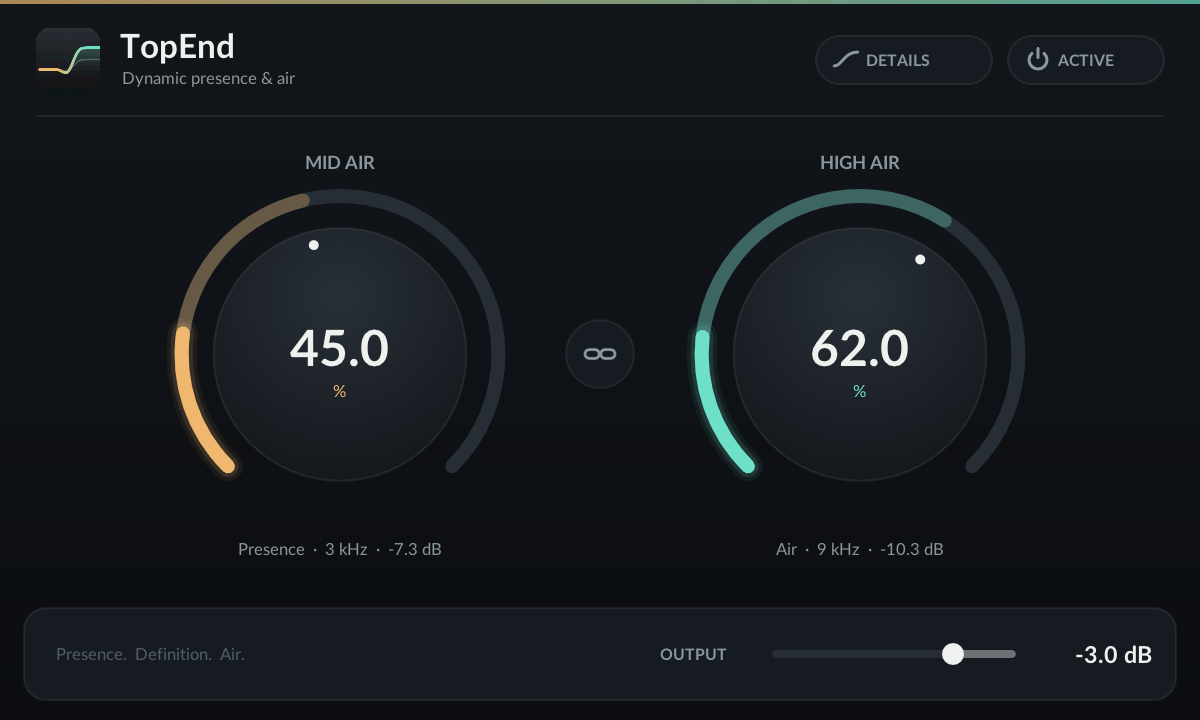
This is TopEnd's editor rebuilt for the browser, running the plug-in's DSP sample for sample. Press play, turn the knobs and switch between Active and Bypass. Open Details for the live response and meters.
Das ist der Editor von TopEnd, nachgebaut für den Browser, mit der DSP des Plug-ins, Sample für Sample. Auf Play drücken, an den Reglern drehen und zwischen Active und Bypass wechseln. Unter Details gibt es den Live-Frequenzgang und die Meter.
Audio is generated and processed in your browser. Your own file never leaves your device. Start quietly, TopEnd doesn't limit.
Audio wird in deinem Browser erzeugt und verarbeitet. Deine eigene Datei verlässt nie dein Gerät. Leise anfangen, TopEnd begrenzt nicht.
Level dependencePegelabhängigkeit
Each band runs through its own 4:1 dynamics. Below the threshold it adds its full amount; above it, the added gain falls, so loud bright material isn't pushed further. Move the input level and watch the lift shrink. The curves use the settings from the editor above.
Jedes Band hat seine eigene 4:1-Dynamik. Unter der Schwelle fügt es den vollen Betrag hinzu, darüber sinkt die zusätzliche Verstärkung, sodass lautes, helles Material nicht weiter angeschoben wird. Verschieb den Eingangspegel und sieh zu, wie die Anhebung schrumpft. Die Kurven nutzen die Einstellungen aus dem Editor oben.
Computed from the plug-in's filters, calibration tables and detector thresholds, for steady tones measured one frequency at a time.
Berechnet aus den Filtern, Kalibriertabellen und Detektorschwellen des Plug-ins, für stehende Töne, eine Frequenz nach der anderen gemessen.
TimingZeitverhalten
When a loud passage arrives, both bands pull back within a millisecond or two. Afterwards Mid Air returns over a few hundred milliseconds and High Air along a gentle S-curve, so sustained brightness doesn't pump on every transient.
Kommt eine laute Passage, ziehen sich beide Bänder innerhalb von ein bis zwei Millisekunden zurück. Danach kehrt Mid Air über einige hundert Millisekunden zurück und High Air entlang einer sanften S-Kurve, damit anhaltende Helligkeit nicht bei jedem Transienten pumpt.
Rendered live by the ported processor: quiet detail at −52 dBFS, then 400 ms of loud material, band gain reduction in dB.
Live vom portierten Prozessor berechnet: leise Details bei −52 dBFS, dann 400 ms lautes Material, Gain-Reduktion pro Band in dB.
How it worksFunktionsweise
The dry signal plus two parallel high-pass paths, each with its own dynamics. No waveshaping, no oversampling, no latency.
Das trockene Signal plus zwei parallele Hochpass-Pfade mit jeweils eigener Dynamik. Kein Waveshaping, kein Oversampling, keine Latenz.
| StageStufe | DetectorDetektor | ThresholdSchwelle | Timing |
|---|---|---|---|
| Mid | Peak of the 3 kHz path, instant attackPeak des 3-kHz-Pfads, sofortiger Attack | −30 dBFS | Two-stage release, 75 and 33 msZweistufiges Release, 75 und 33 ms |
| High 1 | Mean square of the 9 kHz path (10 ms)Mittleres Quadrat des 9-kHz-Pfads (10 ms) | −39.7 dBFS | Smoothed in dB: 1 ms attack, 75 ms releaseIn dB geglättet: 1 ms Attack, 75 ms Release |
| High 2 | Peak of the reduced path, scaled with the controlPeak des reduzierten Pfads, mit dem Regler skaliert | −27.3 dB | 16 ms / 25 ms, so stronger settings compress harder16 ms / 25 ms, stärkere Einstellungen komprimieren also härter |
The amounts come from a measured 101-point calibration table per control, so High at 50 % gives about a third of its 100 % lift. Detection is stereo linked; audio is never summed between channels. At zero amount and zero trim the output equals the input, sample for sample.
Die Beträge stammen aus einer gemessenen Kalibriertabelle mit 101 Punkten pro Regler, High bei 50 % ergibt also etwa ein Drittel der Anhebung bei 100 %. Die Erkennung ist stereo gekoppelt; Audio wird nie zwischen den Kanälen summiert. Bei null Betrag und null Trim ist der Ausgang Sample für Sample gleich dem Eingang.
ControlsRegler
| ControlRegler | RangeBereich | What it doesWas er tut |
|---|---|---|
| Mid Air | 0–100 % | Dynamic presence above about 3 kHz, up to about +14 dB for quiet materialDynamische Präsenz ab etwa 3 kHz, bis etwa +14 dB bei leisem Material |
| High Air | 0–100 % | Dynamic air above about 9 kHz, up to about +23 dB for quiet materialDynamische Air ab etwa 9 kHz, bis etwa +23 dB bei leisem Material |
| Link | on / offan / aus | Moves both controls by the same amount, keeping their offsetBewegt beide Regler um denselben Betrag und behält ihren Abstand bei |
| Output | −12 to 0 dB−12 bis 0 dB | Loudness compensation; compare at matched loudnessLautheitsausgleich; bei gleicher Lautheit vergleichen |
| Bypass | on / offan / aus | 21 ms crossfade to the input; host bypass uses the same crossfade21 ms Überblendung zum Eingang; der Host-Bypass nutzt dieselbe Überblendung |
| Details | viewAnsicht | Live response, band reduction and input/output levelsLive-Frequenzgang, Reduktion pro Band und Ein- und Ausgangspegel |
Drag or scroll a knob, hold Shift or Command for fine control, double-click to type a value. Parameter changes glide over about 11 ms regardless of buffer size. About 0.23 % of one Apple M4 core per stereo instance at 48 kHz.
Regler ziehen oder scrollen, Shift oder Command für Feinsteuerung halten, Doppelklick zum Eintippen eines Werts. Parameteränderungen gleiten unabhängig von der Puffergröße über etwa 11 ms. Rund 0,23 % eines Apple-M4-Kerns pro Stereo-Instanz bei 48 kHz.
InstallInstallation
The disk image on the release page contains AUv2, VST3 and CLAP for Apple Silicon Macs on macOS 11 or newer. Copy the plug-ins you need and rescan in your host. No account, activation or background service.
Das Disk-Image auf der Release-Seite enthält AUv2, VST3 und CLAP für Apple-Silicon-Macs ab macOS 11. Die benötigten Plug-ins kopieren und im Host neu scannen. Kein Konto, keine Aktivierung, kein Hintergrunddienst.
| Plug-in | FolderOrdner |
|---|---|
| TopEnd.component | ~/Library/Audio/Plug-Ins/Components |
| TopEnd.vst3 | ~/Library/Audio/Plug-Ins/VST3 |
| TopEnd.clap | ~/Library/Audio/Plug-Ins/CLAP |
Build & testsBuild & Tests
An Apple Silicon Mac with the Command Line Tools, CMake 3.25+, Ninja and Python 3. Full Xcode isn't needed.
Ein Apple-Silicon-Mac mit den Command Line Tools, CMake 3.25+, Ninja und Python 3. Das volle Xcode ist nicht nötig.
$ git clone --recurse-submodules https://github.com/BTFLV/TopEnd.git
$ cd TopEnd
$ python3 tools/bootstrap.py
$ cmake -S . -B build-release -G Ninja -DCMAKE_BUILD_TYPE=Release -DTOPEND_BUILD_PLUGINS=ON
$ cmake --build build-release
$ python3 tools/install.py --build build-release/out
Every push
auval, the VST3 validator, the CLAP validator and pluginval at strictness 5.
Bei jedem Push
auval, der VST3-Validator, der CLAP-Validator und pluginval mit Strenge 5.
8 to 384 kHz
Any block size, mono and stereo, extreme and subnormal input, ramps and state handling.
8 bis 384 kHz
Jede Blockgröße, Mono und Stereo, extreme und subnormale Eingangswerte, Rampen und Zustandsverwaltung.
Zero allocations
No allocation, locks or I/O in the audio callback. Output never depends on how a host splits blocks.
Null Allokationen
Keine Allokationen, Locks oder I/O im Audio-Callback. Die Ausgabe hängt nie davon ab, wie ein Host die Blöcke aufteilt.
Curve against audio
The response the editor draws is checked against processed tones.
Kurve gegen Audio
Der Frequenzgang, den der Editor zeichnet, wird gegen bearbeitete Töne geprüft.
Sample-identical
Headless AU and CLAP renders match the DSP core sample for sample.
Samplegenau gleich
AU- und CLAP-Renderings ohne Oberfläche stimmen Sample für Sample mit dem DSP-Kern überein.
Offline renderer
Render WAVs, analyze them and prepare blind A/B pairs with the Python helpers.
Offline-Renderer
Mit den Python-Helfern WAVs rendern, analysieren und Blind-A/B-Paare vorbereiten.