The workspaceDie Arbeitsumgebung
Start a scan, import an existing pcap or explore a labelled sample capture. Everything Kismet sees lands in one window that behaves like a Mac app: native menus, file dialogs, keyboard shortcuts.
Einen Scan starten, eine vorhandene pcap importieren oder einen beschrifteten Beispielmitschnitt erkunden. Alles, was Kismet sieht, landet in einem Fenster, das sich wie eine Mac-App verhält: native Menüs, Dateidialoge, Tastenkürzel.
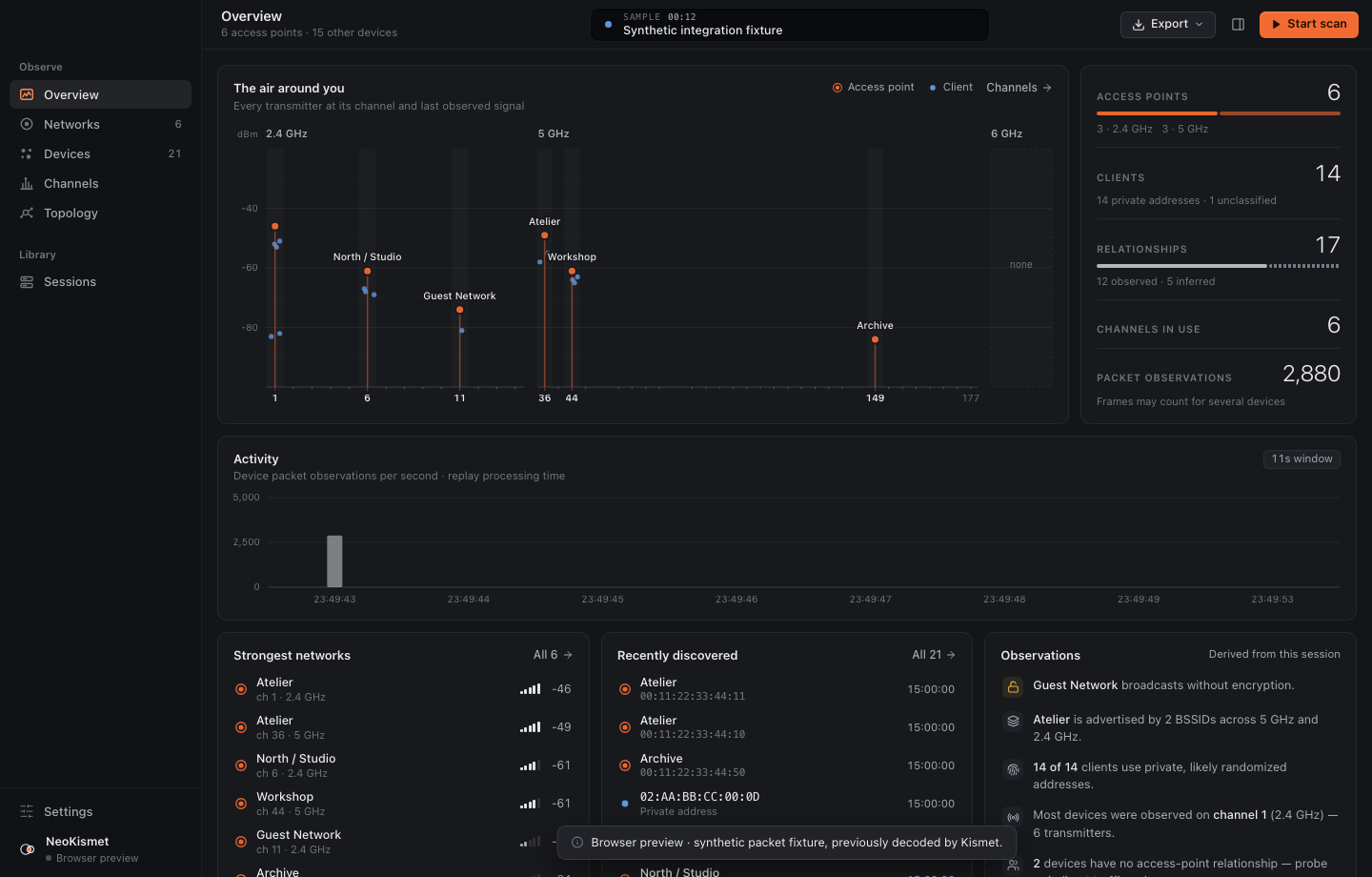
Overview
Air map, session readouts, activity, recent discoveries and plain-language observations.
Übersicht
Air Map, Sitzungswerte, Aktivität, neue Funde und Beobachtungen in Klartext.
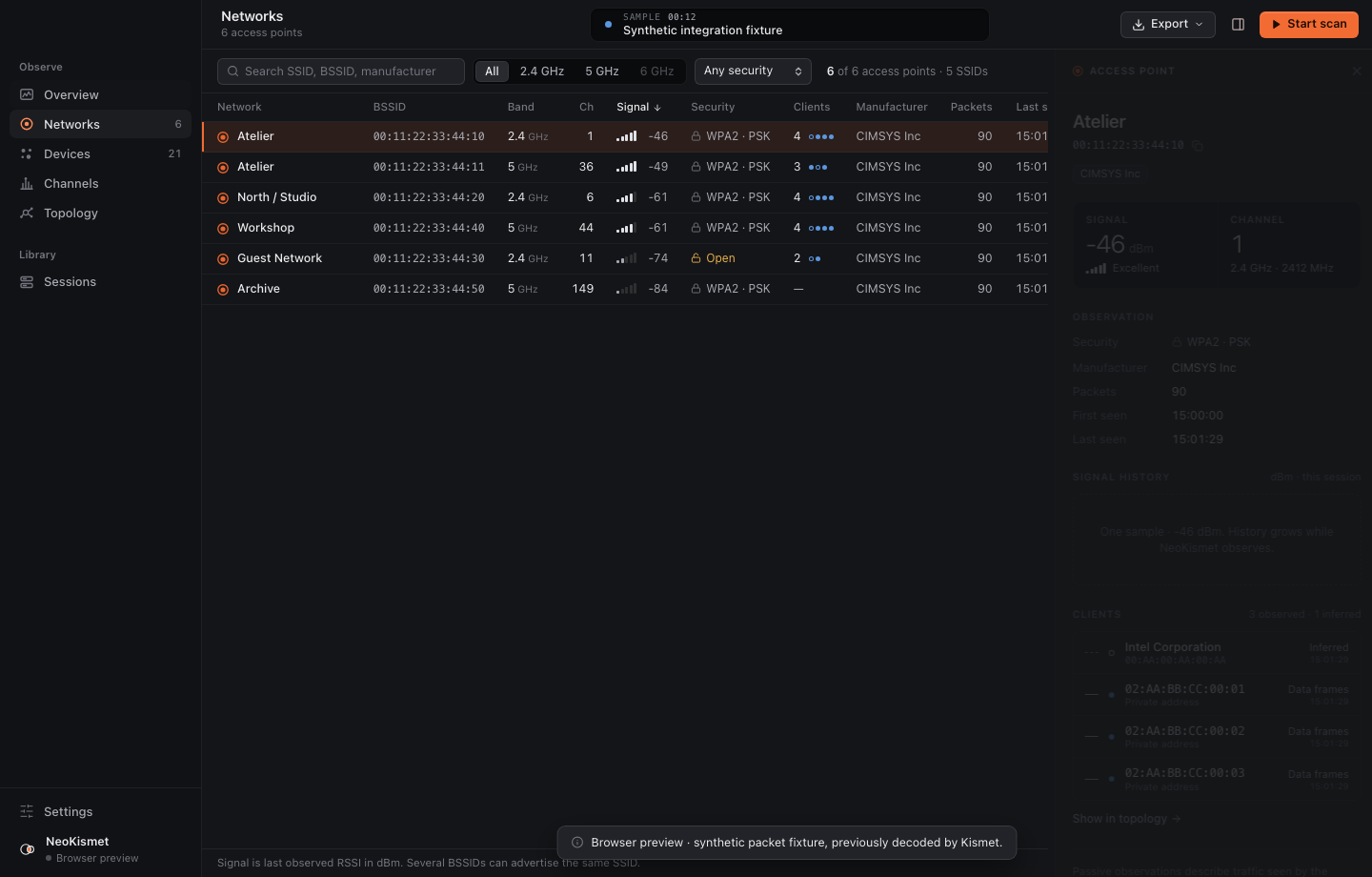
Networks
Every access point, including several BSSIDs sharing one SSID.
Netzwerke
Jeder Access Point, auch wenn sich mehrere BSSIDs eine SSID teilen.
Devices
Observed and inferred devices. Randomized MACs are marked, not trusted.
Geräte
Beobachtete und erschlossene Geräte. Zufällige MACs werden markiert, nicht für bare Münze genommen.
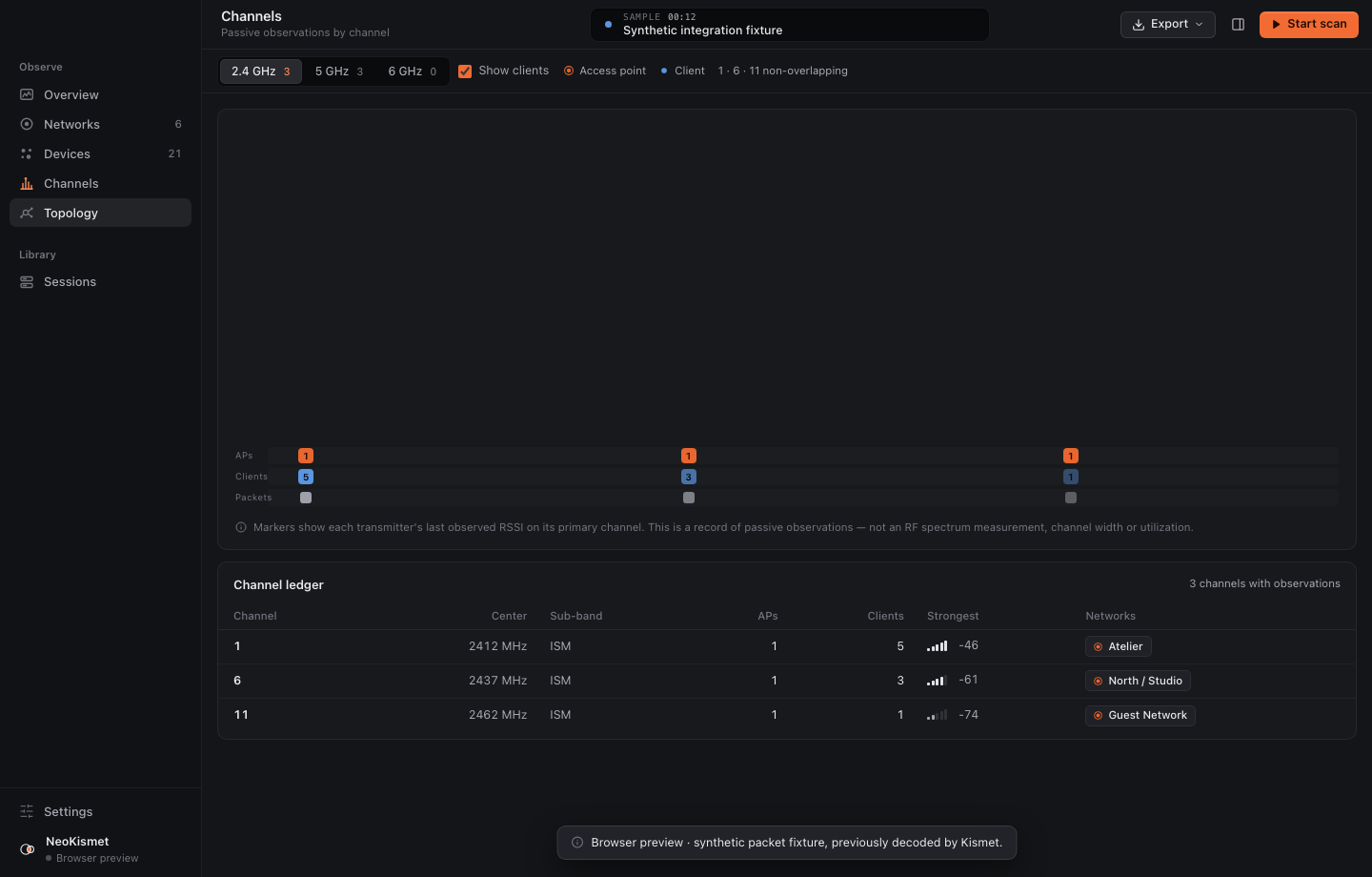
Channels
Who sits where on 2.4, 5 and 6 GHz, by last observed RSSI.
Kanäle
Wer wo auf 2,4, 5 und 6 GHz sitzt, nach zuletzt gemessenem RSSI.
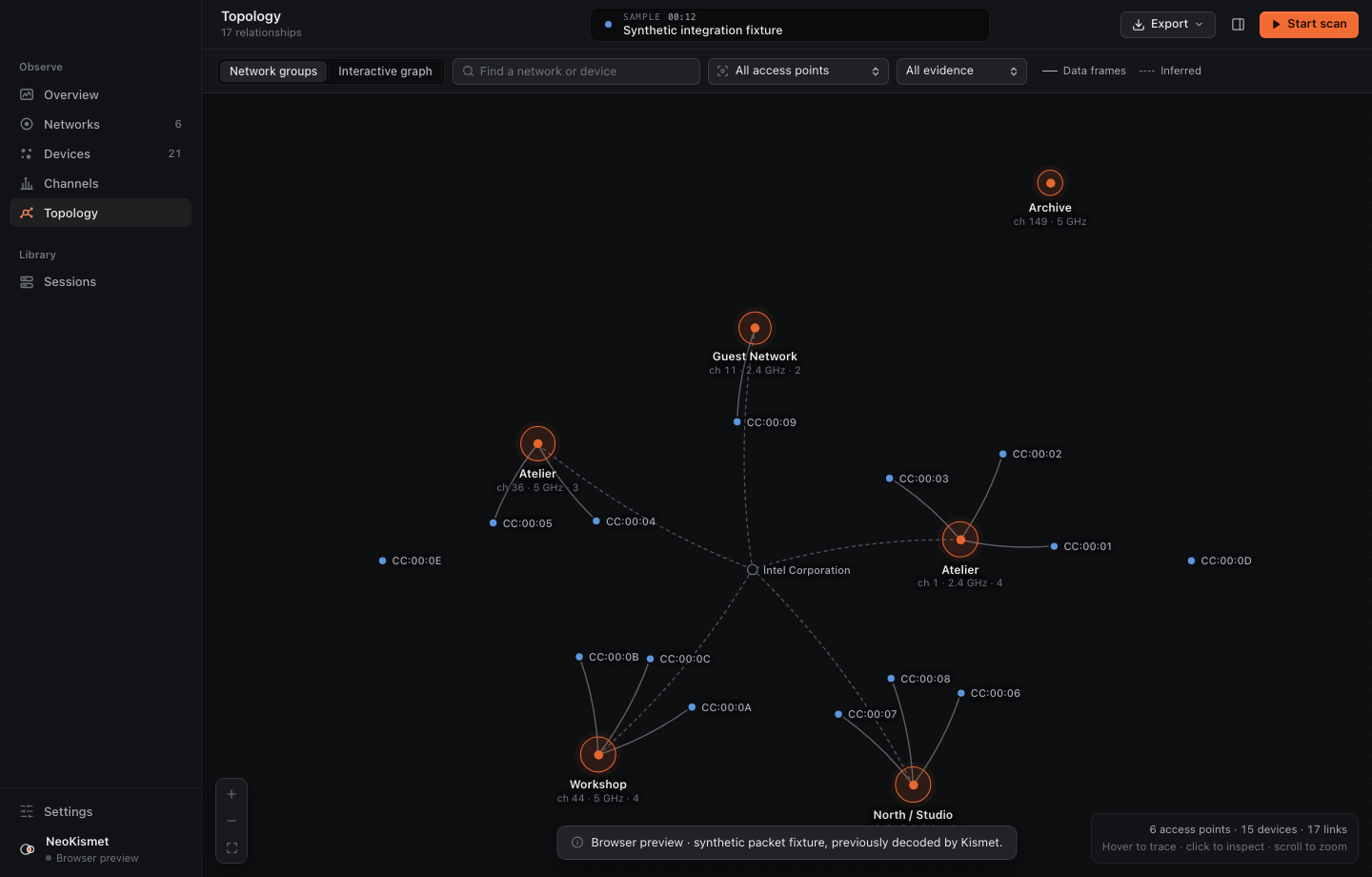
Topology
Network groups and a pannable, zoomable graph of AP/client links.
Topologie
Netzwerkgruppen und ein verschieb- und zoombarer Graph der AP-Client-Verbindungen.
Sessions
Auto-saved snapshots, reopen, pcap import, JSON and CSV export.
Sitzungen
Automatisch gespeicherte Stände, erneut öffnen, pcap-Import, JSON- und CSV-Export.
Built on KismetAuf Basis von Kismet
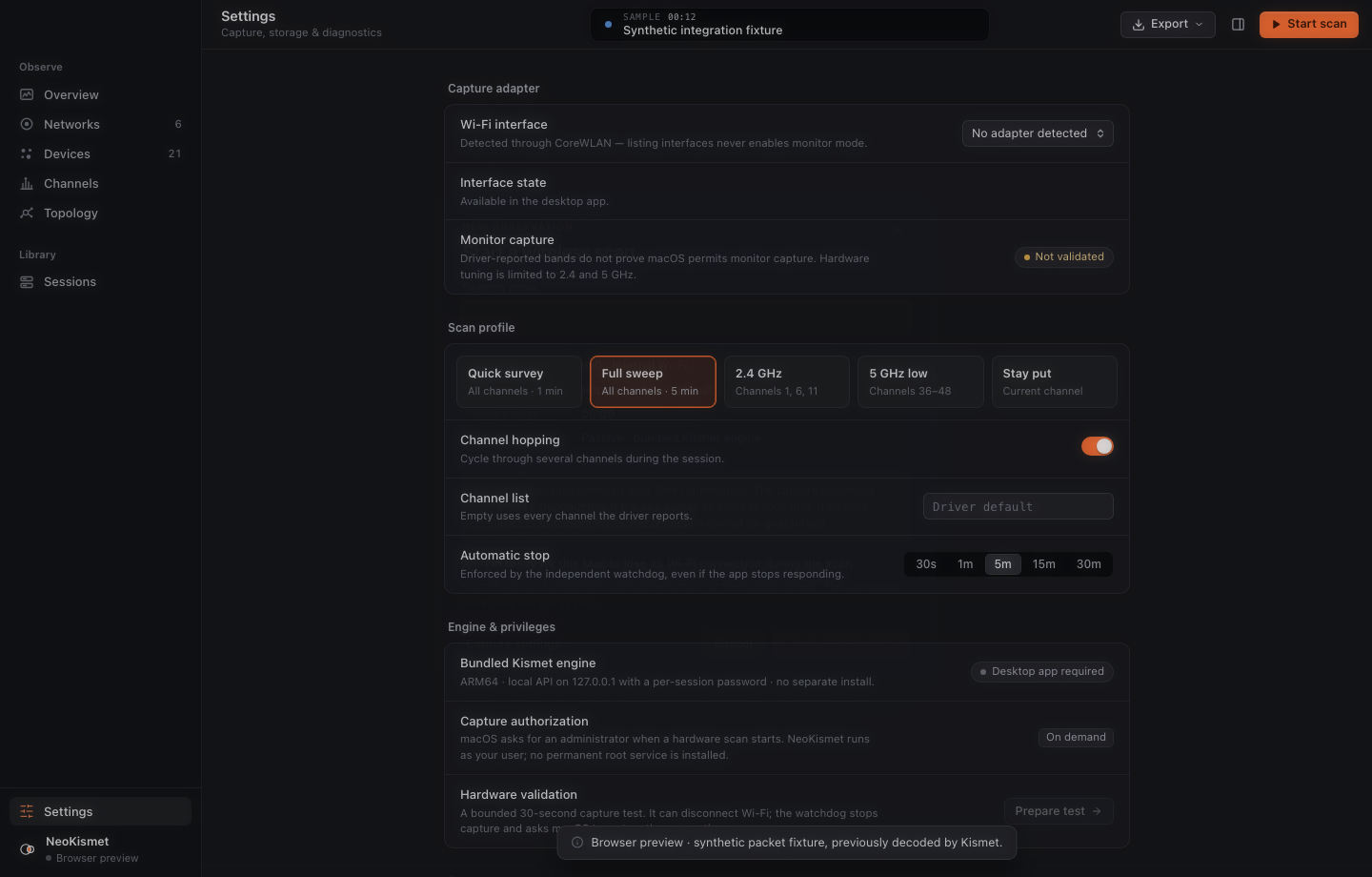
Kismet is a mature, open wireless monitoring tool, and NeoKismet doesn't replace any of it. It bundles a pinned Kismet build and handles what usually comes before the first packet: installing, configuring, starting the server and setting up sources.
Kismet ist ein ausgereiftes, offenes Werkzeug zur Funküberwachung, und NeoKismet ersetzt davon nichts. Es bündelt einen festen Kismet-Build und übernimmt, was normalerweise vor dem ersten Paket ansteht: Installation, Konfiguration, Serverstart und das Einrichten der Quellen.
| StepSchritt | Kismet on its ownKismet allein | With NeoKismetMit NeoKismet |
|---|---|---|
| InstallInstallieren | Package manager or build, plus dependenciesPaketmanager oder selbst bauen, plus Abhängigkeiten | One app. Engine, helpers and libraries are bundledEine App. Engine, Helfer und Bibliotheken sind gebündelt |
| ConfigureKonfigurieren | kismet.conf / kismet_site.conf, sources, loggingkismet.conf / kismet_site.conf, Quellen, Logging | Adapter, hopping, channels and time limit in SettingsAdapter, Hopping, Kanäle und Zeitlimit in den Einstellungen |
| RunStarten | Start the server, log in to the web UIServer starten, in der Web-Oberfläche anmelden | Click Start scan, approve one macOS promptAuf Scan starten klicken, eine macOS-Abfrage bestätigen |
| ExploreErkunden | Web UI for every platform and use caseWeb-Oberfläche für jede Plattform und jeden Zweck | A focused Mac workspace: air map, tables, topologyEine fokussierte Mac-Arbeitsumgebung: Air Map, Tabellen, Topologie |
| StopBeenden | You decide, and restore Wi-Fi yourselfDu entscheidest und stellst das WLAN selbst wieder her | Time limit, watchdog, Wi-Fi is cycled back onZeitlimit, Watchdog, das WLAN wird wieder eingeschaltet |
Kismet runs as a separate process and is talked to over its public local API. A small patch, shipped with full source, only touches monitor-mode error handling, ambiguous 6 GHz channels and per-link data accounting. Everything else is upstream Kismet.
Kismet läuft als eigener Prozess und wird über seine öffentliche lokale API angesprochen. Ein kleiner Patch, mit vollständigem Quellcode ausgeliefert, betrifft nur die Fehlerbehandlung im Monitor-Modus, mehrdeutige 6-GHz-Kanäle und die Datenzählung pro Verbindung. Alles andere ist unverändertes Kismet.
TopologyTopologie
The topology view separates what was seen from what was guessed. A solid edge needs real over-the-air data frames on that exact AP/client link; a dashed one is a Kismet client record without that evidence. Probe requests never draw an edge.
Die Topologie-Ansicht trennt Gesehenes von Vermutetem. Eine durchgezogene Kante braucht echte Datenframes über die Luft auf genau dieser AP-Client-Verbindung; eine gestrichelte ist ein Client-Eintrag von Kismet ohne diesen Nachweis. Probe Requests erzeugen nie eine Kante.
Capture safetySicheres Mitschneiden
PrivilegesRechte
- App and Kismet server run as you. Only the capture helper is elevated, per session, through the normal macOS administrator prompt.
- No root daemon, no setuid install, nothing left running.
- The API binds to 127.0.0.1 on a random port with a random per-session password.
- App und Kismet-Server laufen als du. Nur der Capture-Helfer bekommt erhöhte Rechte, pro Sitzung, über die normale Administrator-Abfrage von macOS.
- Kein Root-Daemon, keine setuid-Installation, nichts läuft im Hintergrund weiter.
- Die API lauscht auf 127.0.0.1 auf einem zufälligen Port mit einem zufälligen Passwort pro Sitzung.
StoppingBeenden
- Captures end at a chosen limit, 30 seconds to 30 minutes.
- An independent watchdog stops them on app exit, crash or missing heartbeat.
- Afterwards the Wi-Fi interface is cycled so macOS can rejoin your network.
- No Wi-Fi passwords are read or stored; sessions stay local and private.
- Mitschnitte enden an einem gewählten Limit, zwischen 30 Sekunden und 30 Minuten.
- Ein unabhängiger Watchdog stoppt sie, wenn die App beendet wird, abstürzt oder kein Lebenszeichen mehr sendet.
- Danach wird die WLAN-Schnittstelle neu gestartet, damit macOS wieder deinem Netz beitreten kann.
- Es werden keine WLAN-Passwörter gelesen oder gespeichert; Sitzungen bleiben lokal und privat.
Status
 coming soonbald verfügbar
Not public yet.Noch nicht öffentlich.
NeoKismet is in development. Source, under the GPL like Kismet itself, follows with the first release.
NeoKismet ist in Entwicklung. Der Quellcode folgt mit dem ersten Release, unter der GPL wie Kismet selbst.