 Meth
MethMenu barMenüleiste
Pick a duration or an exact end time and toggle Closed-Lid Mode. When the session ends, macOS takes over again.
Dauer oder genaue Endzeit wählen und Closed-Lid Mode einschalten. Endet die Sitzung, übernimmt wieder macOS.
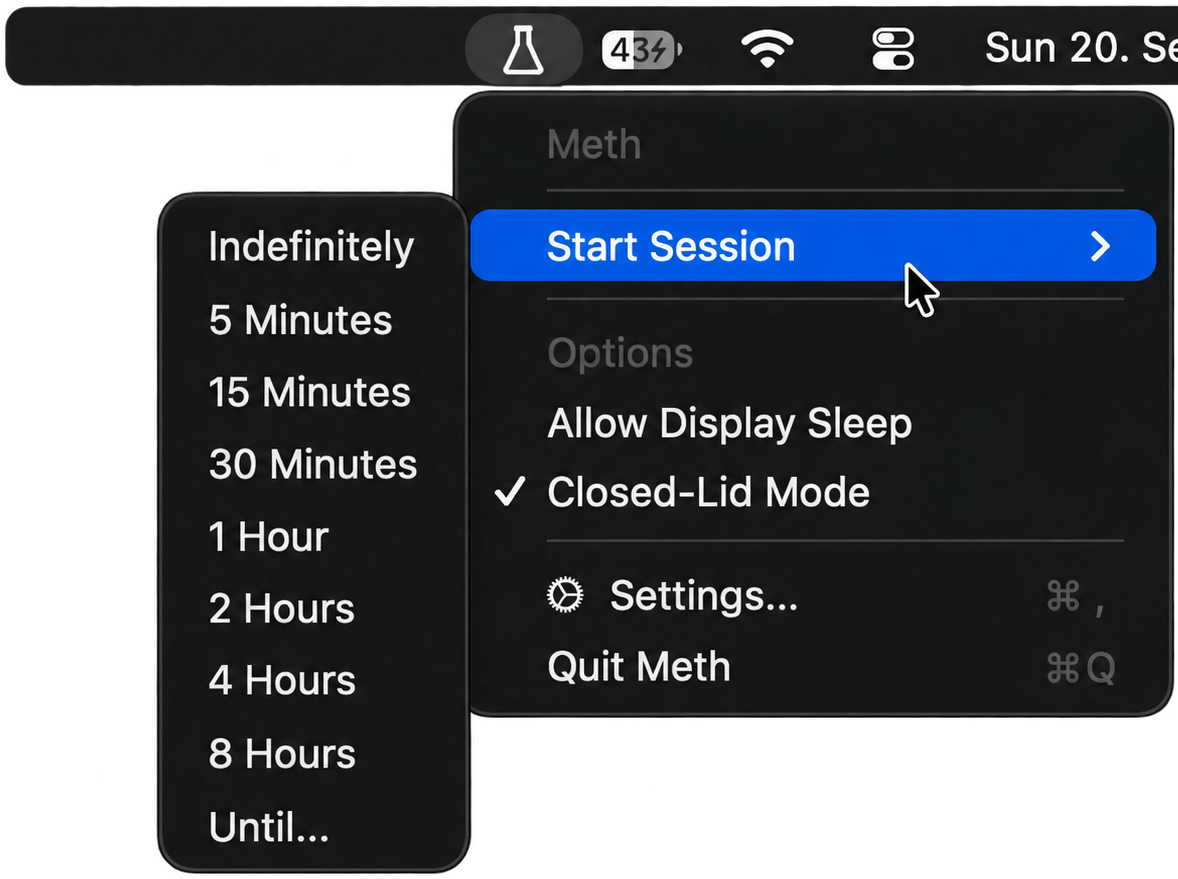
- 01Start SessionIndefinitely, 5 or 15 minutes, 1, 2, 4 or 8 hours, or "Until…" an exact time. Extend a running session by 15 minutes or an hour.
- 01Start SessionUnbegrenzt, 5 oder 15 Minuten, 1, 2, 4 oder 8 Stunden oder „Until…“ bis zu einer genauen Uhrzeit. Eine laufende Sitzung lässt sich um 15 Minuten oder eine Stunde verlängern.
- 02Closed-Lid ModeChecked means the Mac keeps running when you shut the lid. No external display needed.
- 02Closed-Lid ModeIst der Haken gesetzt, läuft der Mac beim Zuklappen weiter. Ein externer Bildschirm ist nicht nötig.
- 03Allow Display SleepLet the screen turn off while the CPU and network stay awake. Both options can be switched while a session runs.
- 03Allow Display SleepDer Bildschirm darf ausgehen, CPU und Netzwerk bleiben wach. Beide Optionen lassen sich während einer laufenden Sitzung umschalten.
- 04Quick toggleOption-click or right-click the menu bar icon to start or stop a session with your last settings.
- 04SchnellschalterWahl-Klick oder Rechtsklick auf das Menüleisten-Symbol startet oder stoppt eine Sitzung mit deinen letzten Einstellungen.
SettingsEinstellungen
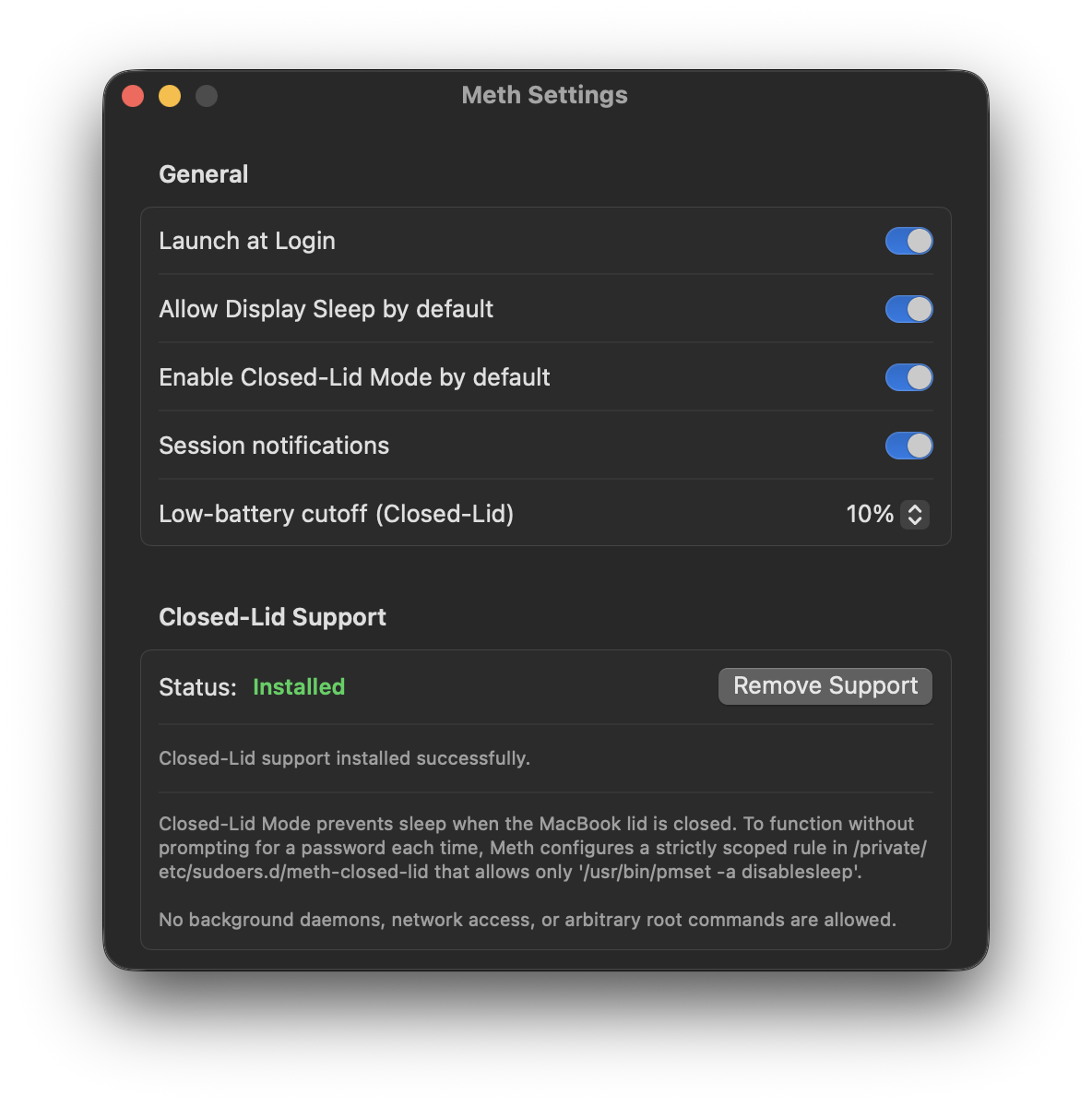
- 01DefaultsWhether new sessions allow display sleep and start in Closed-Lid Mode. Launch at Login, if you want it.
- 01StandardwerteOb neue Sitzungen den Bildschirm schlafen lassen und im Closed-Lid Mode starten. Auf Wunsch Start bei der Anmeldung.
- 02Session notificationsA heads-up five minutes before a timed session ends, with +15 Minutes, +1 Hour and Stop right in the notification, and a note whenever a session stops on its own.
- 02MitteilungenEin Hinweis fünf Minuten vor dem Ende einer zeitlich begrenzten Sitzung, mit +15 Minuten, +1 Stunde und Stopp direkt in der Mitteilung, und eine Meldung, wenn eine Sitzung von selbst endet.
- 03Low-battery cutoffClosed-Lid Mode stops when the battery reaches this level on battery power. Anywhere from 5 to 50 %, 10 % by default.
- 03Akku-UntergrenzeIm Akkubetrieb endet der Closed-Lid Mode, sobald der Akku diesen Stand erreicht. Einstellbar von 5 bis 50 %, standardmäßig 10 %.
- 04Closed-Lid SupportInstall or remove the scoped sudoers rule in one click. The status shows when it needs attention.
- 04Closed-Lid SupportDie eng begrenzte sudoers-Regel mit einem Klick installieren oder entfernen. Der Status zeigt, wenn etwas zu tun ist.
Why not caffeinate?Warum nicht caffeinate?
Built-in caffeinate only prevents idle sleep. Close the lid and macOS goes into clamshell sleep anyway: SSH sessions drop, Docker stalls, long builds abort.
Das eingebaute caffeinate verhindert nur den Ruhezustand bei Inaktivität. Klappst du den Deckel zu, schläft macOS trotzdem ein: SSH-Sitzungen brechen ab, Docker hängt, lange Builds scheitern.
| CapabilityFunktion | caffeinate | Meth |
|---|---|---|
| Idle sleep preventionKeeps the system running while the lid is open.Kein Ruhezustand bei InaktivitätHält das System bei offenem Deckel am Laufen. | yesja | yesja |
| Closed-lid (clamshell) sleep preventionKeeps working with the MacBook shut, no external display.Kein Ruhezustand bei geschlossenem DeckelArbeitet mit zugeklapptem MacBook weiter, ohne externen Bildschirm. | sleepsschläft ein | Closed-Lid Mode |
| Low battery cutoffStops automatically at a level you choose.Akku-UntergrenzeStoppt automatisch bei einem Stand deiner Wahl. | drains to 0%leert bis 0 % | 5–50 %, default 10 %5–50 %, Standard 10 % |
| Thermal cutoffStops when macOS reports critical thermal pressure.Abschaltung bei HitzeStoppt, wenn macOS kritische Temperaturen meldet. | nonekeine | automaticautomatisch |
| Crash recoveryRestores normal sleep if the app is killed.AbsturzschutzStellt den normalen Ruhezustand wieder her, wenn die App beendet wird. | nonekeiner | watchdog processWatchdog-Prozess |
| Presets and "until" times5 min, 1 h, 8 h or "until 23:00".Voreinstellungen und Endzeiten5 min, 1 h, 8 h oder „bis 23:00“. | CLI flagsCLI-Flags | one click, Shortcuts, CLIein Klick, Kurzbefehle, CLI |
| Telemetry and daemonsTelemetrie und Daemons | offline | offline, open sourceoffline, Open Source |
FeaturesFunktionen
No helper frameworks, no root processes. Swift, native IOKit assertions and one tightly scoped pmset call.
Keine Hilfs-Frameworks, keine Root-Prozesse. Swift, native IOKit-Assertions und ein einziger, eng begrenzter pmset-Aufruf.
Closed-Lid Mode
Shut the MacBook without triggering clamshell sleep. The internal display turns off, no dummy display plug required.
Closed-Lid Mode
MacBook zuklappen, ohne dass es einschläft. Der interne Bildschirm geht aus, ein Dummy-Display-Stecker ist nicht nötig.
"Until…" sessions
Stay awake until 18:30 or 06:00, then hand control back to macOS automatically.
Sitzungen „bis …“
Wach bleiben bis 18:30 oder 06:00, danach geht die Kontrolle automatisch an macOS zurück.
Battery and thermal cutoffs
Closed-Lid Mode won't start, and stops a running session, at your battery threshold or under critical thermal pressure.
Akku- und Hitzeabschaltung
Unterhalb deiner Akku-Untergrenze oder bei kritischer Temperatur startet der Closed-Lid Mode nicht, und eine laufende Sitzung endet.
Crash recovery
An independent watchdog restores default sleep settings if Meth exits unexpectedly.
Absturzschutz
Ein unabhängiger Watchdog stellt die normalen Ruhezustand-Einstellungen wieder her, falls Meth unerwartet beendet wird.
Notifications
Extend or stop a timed session straight from the notification five minutes before it ends.
Mitteilungen
Fünf Minuten vor dem Ende eine Sitzung direkt aus der Mitteilung heraus verlängern oder stoppen.
Zero daemons, zero telemetry
No outbound requests, no analytics, never runs as root, leaves nothing behind.
Keine Daemons, keine Telemetrie
Keine ausgehenden Anfragen, keine Analyse, läuft nie als root und hinterlässt nichts.
AutomationAutomatisierung
Start a session from a script before a long build, from Raycast or Alfred, or from a Shortcut. Meth offers the same controls in three places.
Eine Sitzung per Skript vor einem langen Build starten, aus Raycast oder Alfred oder über einen Kurzbefehl. Meth bietet dieselben Steuerungen an drei Stellen.
Shortcuts and SpotlightKurzbefehle und Spotlight
- Start Keep-Awake Session, with duration, Closed-Lid Mode and display sleepStart Keep-Awake Session, mit Dauer, Closed-Lid Mode und Bildschirmruhe
- Stop Keep-Awake Session
- Extend Keep-Awake Session
- Get Keep-Awake Status
URL schemeURL-Schema
$ open "meth://start?minutes=60&closedLid=1"
$ open "meth://extend?minutes=15"
$ open "meth://toggle"
$ open "meth://stop"
$ /Applications/Meth.app/Contents/MacOS/Meth start --hours 2 --closed-lid
$ /Applications/Meth.app/Contents/MacOS/Meth start --until 06:00 --allow-display-sleep
$ /Applications/Meth.app/Contents/MacOS/Meth extend --minutes 30
$ /Applications/Meth.app/Contents/MacOS/Meth status   # JSON
SecuritySicherheit
Preventing clamshell sleep means toggling the kernel's SleepDisabled flag via pmset. Meth does that without ever running as root.
Um den Ruhezustand bei geschlossenem Deckel zu verhindern, muss das SleepDisabled-Flag des Kernels per pmset umgeschaltet werden. Meth macht das, ohne je als root zu laufen.
A scoped sudoers ruleEine eng begrenzte sudoers-Regel
When you install Closed-Lid support, Meth asks for admin authentication once and installs a sudoers drop-in that allows exactly two commands, with no wildcards:
Bei der Installation des Closed-Lid Supports fragt Meth einmal nach dem Admin-Passwort und legt eine sudoers-Datei an, die genau zwei Befehle erlaubt, ohne Platzhalter:
%admin ALL=(ALL) NOPASSWD: /usr/bin/pmset -a disablesleep 0, /usr/bin/pmset -a disablesleep 1
The file is validated with visudo -c -f before it is moved into place atomically. Removing support deletes it again.
Die Datei wird mit visudo -c -f geprüft, bevor sie atomar an ihren Platz verschoben wird. Beim Entfernen des Supports wird sie wieder gelöscht.
Verify it yourselfSelbst nachprüfen
$ pmset -g assertions
$ pmset -g | grep disablesleep
With Closed-Lid Mode on you'll see SleepDisabled = 1, otherwise 0. If normal sleep can't be restored automatically, the menu bar icon shows a warning and the menu offers to restore it.
Mit aktivem Closed-Lid Mode steht dort SleepDisabled = 1, sonst 0. Lässt sich der normale Ruhezustand nicht automatisch wiederherstellen, zeigt das Menüleisten-Symbol eine Warnung, und das Menü bietet die Wiederherstellung an.
InstallInstallation
One Universal 2 app for Apple Silicon and Intel, signed with an Apple Developer ID and notarized by Apple.
Eine Universal-2-App für Apple Silicon und Intel, signiert mit einer Apple Developer ID und von Apple notarisiert.
Direct installDirekt installieren
- Download Meth-<version>.zip from the latest release; SHA256SUMS.txt holds its checksum.
- Unzip it and move Meth.app into Applications.
- Open it and confirm the usual "downloaded from the internet" prompt.
- For Closed-Lid Mode: Settings → Closed-Lid Support → Install Support.
- Meth-<version>.zip aus dem neuesten Release laden; die Prüfsumme steht in SHA256SUMS.txt.
- Entpacken und Meth.app in den Ordner Programme ziehen.
- Öffnen und die übliche Nachfrage „aus dem Internet geladen“ bestätigen.
- Für den Closed-Lid Mode: Settings → Closed-Lid Support → Install Support.
Build from sourceAus dem Quellcode bauen
$ git clone https://github.com/BTFLV/Meth.git
$ cd Meth
$ swift build -c release
Or package a Universal 2 app with ./scripts/build_app.sh. Local builds are ad-hoc signed.
Oder mit ./scripts/build_app.sh eine Universal-2-App paketieren. Lokale Builds sind ad hoc signiert.
FAQ
Can I put my running MacBook in a backpack?
No. A closed bag has no airflow, and Meth keeps the CPU and GPU running. Keep the laptop somewhere well ventilated. If macOS reports critical thermal pressure, Meth ends Closed-Lid Mode on its own.
Why doesn't caffeinate work with the lid shut?
It uses user-space idle assertions, which macOS deliberately ignores once the lid switch trips. Overriding that requires setting SleepDisabled via pmset, which is what Meth does.
Will it drain my battery if I forget it?
No. Closed-lid sessions won't start at or below your low-battery cutoff (10 % unless you change it), a running session stops when it reaches it, and you get a notification when that happens.
Why is it called Meth?
Because when caffeine isn't strong enough anymore, it's time for the hard stuff. It's software. Don't consume your laptop.
How do I uninstall it?
Settings → Closed-Lid Support → Remove Support restores the default sleep settings and deletes the sudoers file. Then drag Meth.app to the Trash.
Kann ich das laufende MacBook in den Rucksack stecken?
Nein. In einer geschlossenen Tasche gibt es keine Luftzirkulation, und Meth hält CPU und GPU am Laufen. Den Laptop also gut belüftet ablegen. Meldet macOS kritische Temperaturen, beendet Meth den Closed-Lid Mode von selbst.
Warum funktioniert caffeinate nicht bei geschlossenem Deckel?
Es nutzt Assertions im User-Space, die macOS bewusst ignoriert, sobald der Deckelschalter auslöst. Um das zu umgehen, muss SleepDisabled per pmset gesetzt werden, und genau das macht Meth.
Leert es meinen Akku, wenn ich es vergesse?
Nein. Sitzungen mit geschlossenem Deckel starten nicht an oder unter deiner Akku-Untergrenze (10 %, sofern du sie nicht änderst), eine laufende Sitzung endet beim Erreichen, und du bekommst dazu eine Mitteilung.
Warum heißt es Meth?
Weil, wenn Koffein nicht mehr reicht, die harten Sachen dran sind. Es ist Software. Bitte den Laptop nicht konsumieren.
Wie deinstalliere ich es?
Settings → Closed-Lid Support → Remove Support stellt die normalen Ruhezustand-Einstellungen wieder her und löscht die sudoers-Datei. Danach Meth.app in den Papierkorb ziehen.