 IronClip
EditorEditor
Clip history, transfer curve and clip meter show what the clipper does. No accounts, activation, telemetry, updaters or background processes.
Clip-Verlauf, Kennlinie und Clip-Meter zeigen, was der Clipper tut. Keine Konten, keine Aktivierung, keine Telemetrie, keine Updater und keine Hintergrundprozesse.
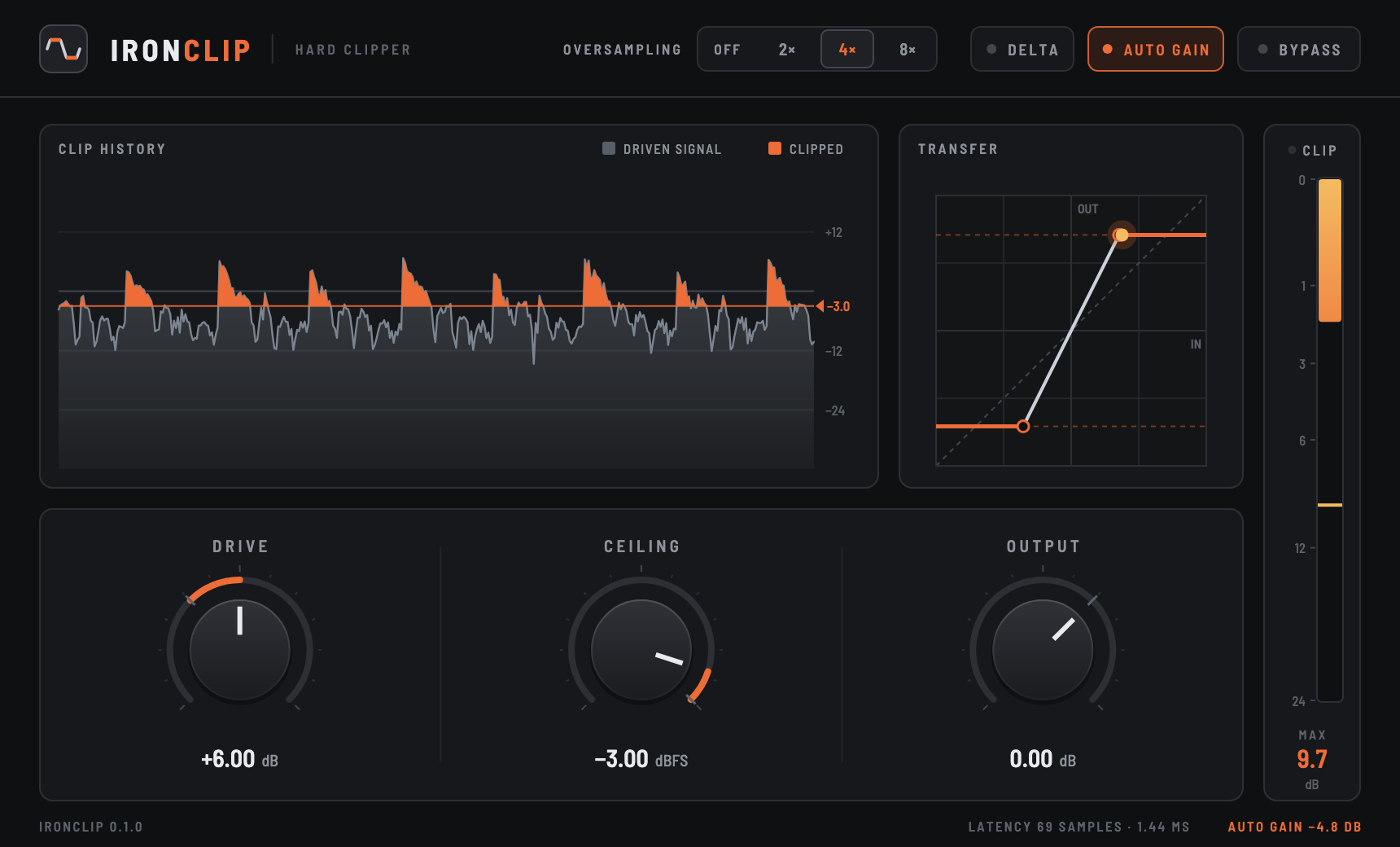
Drive, Ceiling, Output
Push the signal into the ceiling, set where it clips, trim the result.
Drive, Ceiling, Output
Das Signal in die Obergrenze fahren, festlegen, wo es clippt, das Ergebnis nachregeln.
Off, 2×, 4×, 8×
Linear-phase oversampling keeps aliasing out of the audible band. Off is truly zero-latency.
Aus, 2×, 4×, 8×
Linearphasiges Oversampling hält Aliasing aus dem hörbaren Bereich heraus. Aus bedeutet wirklich null Latenz.
Delta
Listen only to what the clipper cuts, perfectly time-aligned in every oversampling mode.
Delta
Nur das hören, was der Clipper abschneidet, in jedem Oversampling-Modus exakt zeitlich ausgerichtet.
Auto gain
Matches the output loudness to the input, so comparisons do not depend on level.
Auto Gain
Gleicht die Ausgangslautheit an den Eingang an, damit Vergleiche nicht vom Pegel abhängen.
Clip meter
How far the signal exceeds the ceiling, with peak hold and a resettable maximum.
Clip-Meter
Wie weit das Signal über der Obergrenze liegt, mit Peak Hold und rücksetzbarem Maximum.
Bypass
Crossfades to the latency-aligned dry signal, so switching never jumps in time or clicks.
Bypass
Blendet auf das latenzausgeglichene trockene Signal über, damit das Umschalten nie springt oder knackt.
ControlsRegler
| ControlRegler | RangeBereich | What it doesWas er tut |
|---|---|---|
| Drive | −12 to +24 dB−12 bis +24 dB | Gain before the clipper. More drive, more clipping.Verstärkung vor dem Clipper. Mehr Drive, mehr Clipping. |
| Ceiling | −30 to 0 dBFS−30 bis 0 dBFS | The clipping threshold, identical for positive and negative peaks.Die Clipping-Schwelle, gleich für positive und negative Peaks. |
| Output | −24 to +12 dB−24 bis +12 dB | Gain after the clipper.Verstärkung nach dem Clipper. |
| Oversampling | Off, 2×, 4×, 8×Aus, 2×, 4×, 8× | Clips at a higher rate to suppress aliasing. Adds 63, 69 or 71 samples of reported latency.Clippt mit höherer Abtastrate, um Aliasing zu unterdrücken. Fügt 63, 69 oder 71 Samples gemeldete Latenz hinzu. |
| Delta | on / offan / aus | Outputs only the removed part of the signal.Gibt nur den entfernten Teil des Signals aus. |
| Auto Gain | on / offan / aus | Brings the output back to the input's loudness.Bringt die Ausgabe zurück auf die Lautheit des Eingangs. |
| Bypass | on / offan / aus | Smoothly crossfades to the latency-aligned dry signal.Blendet weich auf das latenzausgeglichene trockene Signal über. |
Drag knobs vertically, hold Shift or Ctrl/Cmd for fine steps, double-click to reset, click a value to type it. The window resizes from 75 to 200 %.
Regler senkrecht ziehen, Shift oder Strg/Cmd halten für feine Schritte, Doppelklick zum Zurücksetzen, auf einen Wert klicken, um ihn einzutippen. Das Fenster lässt sich von 75 bis 200 % skalieren.
How it worksFunktionsweise
Under the hoodUnter der Haube
- Oversampling uses cascaded linear-phase half-band FIR filters (Parks–McClellan), flat to 0.45 × the sample rate with at least 104 dB alias rejection per stage.
- Latency is padded to whole samples, so Bypass and Auto Gain line up sample-exactly; Delta is computed in the oversampled domain.
- Auto Gain compares the long-term energy of driven and clipped signal and holds its estimate during silence.
- Real-time safe: no allocation, locks or system calls on the audio thread; NaN and infinite input can't corrupt the filter state.
- Das Oversampling nutzt kaskadierte linearphasige Halbband-FIR-Filter (Parks–McClellan), flach bis 0,45 × Abtastrate mit mindestens 104 dB Alias-Unterdrückung pro Stufe.
- Die Latenz wird auf ganze Samples aufgefüllt, damit Bypass und Auto Gain samplegenau übereinanderliegen; Delta wird in der überabgetasteten Domäne berechnet.
- Auto Gain vergleicht die Langzeitenergie von angetriebenem und geclipptem Signal und hält seine Schätzung in Stille fest.
- Echtzeitfest: keine Allokationen, Locks oder Systemaufrufe im Audio-Thread; NaN und unendliche Eingangswerte bringen die Filter nicht durcheinander.
Aliasing, worst caseAliasing im schlimmsten Fall
6.5 kHz sine driven ~23 dB past the ceiling at 48 kHz: alias energy relative to the harmonics.
6,5-kHz-Sinus, bei 48 kHz rund 23 dB über die Obergrenze gefahren: Alias-Energie relativ zu den Obertönen.
Cost on an Apple M4: about 1.3 ns per sample and channel with oversampling off, roughly 0.013 % of one core per instance; 11, 19 and 31 ns at 2×, 4× and 8×.
Rechenaufwand auf einem Apple M4: etwa 1,3 ns pro Sample und Kanal ohne Oversampling, rund 0,013 % eines Kerns pro Instanz; 11, 19 und 31 ns bei 2×, 4× und 8×.
InstallInstallation
The latest release always holds the newest build that passed all tests and plug-in validators. Unzip, copy the plug-ins you need, rescan in your host.
Das neueste Release enthält immer den aktuellsten Build, der alle Tests und Plug-in-Validatoren bestanden hat. Entpacken, die benötigten Plug-ins kopieren, im Host neu scannen.
| Format | macOS (per user)macOS (pro Benutzer) | Windows |
|---|---|---|
| VST3 | ~/Library/Audio/Plug-Ins/VST3/ | C:\Program Files\Common Files\VST3\ |
| CLAP | ~/Library/Audio/Plug-Ins/CLAP/ | C:\Program Files\Common Files\CLAP\ |
| AU | ~/Library/Audio/Plug-Ins/Components/ | — |
macOS 11+ universal (Apple Silicon and Intel) and Windows 10/11 64-bit. Unsigned macOS builds are blocked by Gatekeeper until the quarantine flag is removed:
macOS 11+ Universal (Apple Silicon und Intel) und Windows 10/11 64 Bit. Unsignierte macOS-Builds blockiert Gatekeeper, bis das Quarantäne-Flag entfernt ist:
$ xattr -dr com.apple.quarantine ~/Library/Audio/Plug-Ins/VST3/IronClip.vst3
$ xattr -dr com.apple.quarantine ~/Library/Audio/Plug-Ins/CLAP/IronClip.clap
$ xattr -dr com.apple.quarantine ~/Library/Audio/Plug-Ins/Components/IronClip.component
Build from sourceAus dem Quellcode bauen
CMake 3.25+, Git and Bash; Xcode or the Command Line Tools on macOS, Visual Studio 2022 on Windows. Built with iPlug2 and Skia.
CMake 3.25+, Git und Bash; unter macOS Xcode oder die Command Line Tools, unter Windows Visual Studio 2022. Gebaut mit iPlug2 und Skia.
$ git clone --recurse-submodules https://github.com/BTFLV/IronClip.git
$ cd IronClip
$ scripts/bootstrap.sh
$ cmake -S . -B build -G Ninja
$ cmake --build build --config Release
# DSP tests and validators
$ ctest --test-dir build --output-on-failure